 DolbyFlow
Security & privacy
What we keep.
What we never see.
DolbyFlow is built so that the things you say never pass through us. Here, in plain words, is where everything goes.
Never reaches DolbyFlow’s servers
- Your voice and your recordingsSpeech runs on your Mac, your server, or the provider you chose with your own key.
- Everything you dictateYour history stays on the Mac, for as long as you choose.
- Your meeting notes and transcriptsKept in DolbyFlow’s database on your Mac or phone. A note you choose to share is encrypted on your device first, so we can’t read it.
- Your API keysIn the Mac’s Keychain or Windows Credential Manager.
What our servers hold
- Your accountName, email, how you sign in, and the devices you’re signed in on.
- Your licenceWhich plan you hold and when you bought it.
- Company seatsFor Enterprise: who has a seat, and the company sign-in settings.
- Notes you chose to shareOnly as ciphertext we can’t read, with who shared it, when, until when, its size and how often a link was opened.
The one exception is Pro monthly, which is coming soon and runs on DolbyFlow Cloud. When it launches, this page will say exactly what it keeps. No other plan uses it.
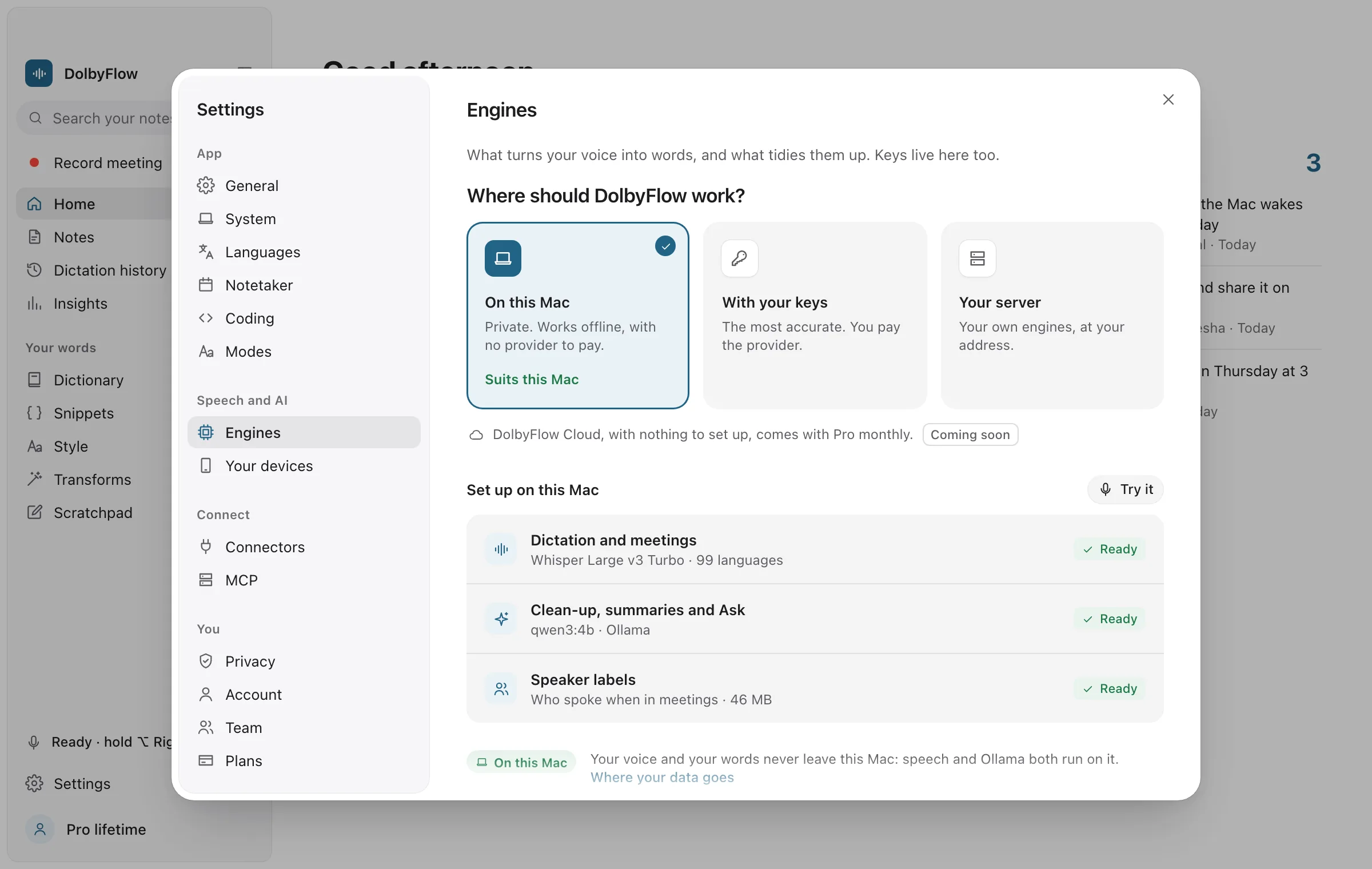
Settings › Engines. The line at the bottom always says, in words, where your voice and your words go.
You choose the engine
On this Mac. Speech runs on your Mac’s chip, and AI runs in a model DolbyFlow downloads for your Mac, or through Ollama or LM Studio. Nothing leaves the Mac.
With your keys. Your audio goes straight from your Mac to OpenAI, Anthropic or ElevenLabs, under your own account and their terms. Your Mac adds the key when it sends; the app’s window never holds it.
Your server. Any OpenAI-compatible address: Speaches or faster-whisper for speech, Ollama, LM Studio or vLLM for AI.
Keys
Keys are kept in the Mac’s Keychain (Credential Manager on Windows), never in a file and never synced. A saved key can be checked or removed, but it can’t be shown again, not even to you.
On the phone, keys live in the phone’s secure storage and are left out of phone backups.
Your phone and your Mac
A paired phone uses your Mac’s engines over your own network. What it sends goes only to that Mac, never through DolbyFlow’s servers.
Pairing takes a one-time code that ends in ten minutes. You can remove a phone at any time, and it has to pair again to come back.
Sharing a note
Sharing is off until you share a note, one at a time. A share link is end-to-end encrypted: your Mac encrypts the note (AES-256-GCM) with a new key, we store only the ciphertext, and the key travels in the part of the link after #, which browsers never send to us. The page at dolbyflow.com/n/ decrypts it in the reader’s browser, with no sign-in. Every link expires (1 to 90 days); its encrypted note is deleted from our server within a day after, and at once when you revoke it.
The team space, for company seats, holds notes encrypted with your team’s key. An admin makes the key on their device and sends it to members through your own channel; we never see it. Anyone your company gives the key to can read the space, so treat it like a password.
What our server sees: who shared, into which company, when, until when, how big, and how many times a link was opened. Never a key, a title or a word. Admins can turn sharing off for everyone, which also stops every link already shared.
Where your data lives
Dictation history: on your Mac, kept for 7, 30, 90 or 365 days, or not at all. It starts at 30.
Meeting notes and recordings: on the device that made them.
Logs: they never hold what you said, the audio or a key. Crash reports stay on your computer.
Training
We don’t train AI on your data. We never receive it, so there is nothing to train on. If you use your own key, that provider’s terms apply to what you send them. AI and training has the details.
For companies
Engines set once, for everyone. An admin chooses where speech and AI may run for the whole company, including your own team server, which each seat then uses with its own key and no pairing. Each app applies it and keeps the last policy offline.
Retention on each device. Notes, recordings and dictation history are deleted on every seat’s devices once they are older than you set, after a day’s notice.
Company sign-in (SSO) with Okta, Microsoft Entra ID or Google, over SAML or OpenID Connect, on domains you prove with a DNS record. You can require it for your domain, so nobody signs in with a personal account there.
Admins and an audit log. Owners, admins and billing admins; every admin action is logged, kept for a year and exportable as CSV. SCIM provisioning from Okta or Entra ends a person’s sessions the moment they are deprovisioned.
A data processing agreement and our subprocessors are public, and the Trust center gathers what a security review asks first.
Our servers
They hold accounts and licences only. They run on Amazon Web Services in the USA (us-east-1): AWS Lambda behind an API gateway, over PostgreSQL.
Encrypted in transit with TLS (HSTS on every answer) and at rest with AWS KMS keys that rotate every year. Keys and secrets live in AWS Secrets Manager, never in code.
Each person’s data is kept apart by the database itself (row-level security on every table), and tests prove one account cannot read or write another’s.
Access and logs
Only named staff, with a verified sign-in, can reach the admin tools, and every action they take is written to a record that is never changed.
Server logs keep only allowed fields: the time, the route, the result, how long it took and the account’s id. Never content, names, emails, keys or IP addresses. They are deleted after 30 days; encrypted database backups after 35. Changes to our AWS account are recorded by CloudTrail.
A sign-in can be used once, and a session token that is copied and replayed ends that session.
If something goes wrong
We investigate, contain and fix, then tell the people affected and the authorities the law names, without undue delay (within 72 hours where the GDPR asks), with what happened and what to do.
Found a security problem? Write to support@dolbyflow.com with “Security report” in the subject. We reply within 3 working days, keep you told, and credit you if you wish. Test only your own account, don’t access others’ data, and give us time to fix it before you publish. We won’t take legal action against research done in good faith that follows these rules.
Standards
DolbyFlow’s design and architecture follow the practices of SOC 2, ISO 27001 and HIPAA, and we are working toward them. We are not certified or audited against any of them today, and we don’t sign HIPAA business associate agreements yet.
For health or other sensitive conversations, use On this Mac, or your own server, so nothing leaves your control.
Deleting
Delete one dictation or note, or clear the whole history, on the device. Uninstalling removes everything the app kept there.
Delete your account in Settings › Account, and it goes from our servers too.
See it for yourself
Pull the Wi-Fi.
Keep talking.
On this Mac, speech runs on the Mac itself, with a model downloaded once. Nothing leaves it.